Content creators, vloggers, and educators know that producing high-quality video consistently is a demanding process. The right digital tools can streamline your workflow, from scripting and recording to editing and publishing. This guide explores the essential apps for content creators, with a special focus on teleprompter solutions that help you deliver your message with confidence and clarity.
Why Every Creator Needs a Dedicated App Toolkit
For anyone serious about building an audience through video, the ad-hoc approach of using whatever tool is at hand quickly becomes a bottleneck. A dedicated toolkit of specialized applications addresses the core pain points of modern content creation: limited time, the need for consistency, and the desire for professional polish. By moving beyond basic, all-in-one solutions, creators can automate repetitive tasks, ensure higher production values, and ultimately reclaim hours in their week. This strategic approach transforms video production from a chaotic scramble into a reliable, repeatable system.
Streamlining the Pre-Production Process
The work of a great video begins long before you hit record. Pre-production involves brainstorming, researching, scripting, and planning shots—a phase where disorganization can derail entire projects. Specialized apps in this category act as your digital producer, helping you organize ideas into actionable plans. For instance, mind-mapping apps can help visualize the flow of a complex tutorial, while dedicated writing software ensures your script is tight and well-structured. By centralizing these tasks, you eliminate the friction of switching between generic note-taking apps and word processors, creating a seamless path from concept to a finalized, ready-to-shoot script.
Enhancing On-Camera Performance and Confidence
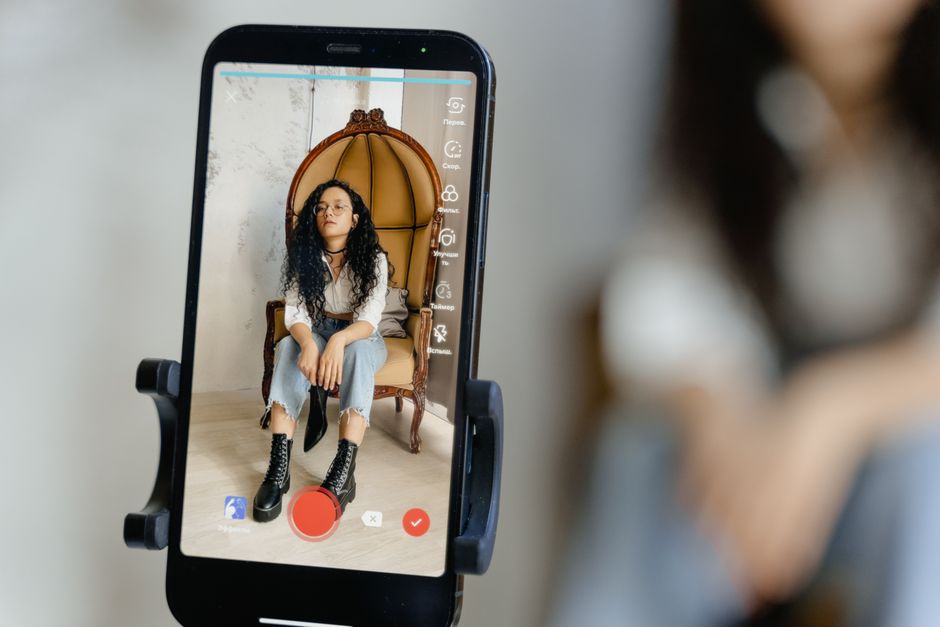
Even the most knowledgeable creator can falter when facing a camera lens. Forgetting key points, sounding robotic, or failing to maintain eye contact are common challenges that undermine credibility. This is where tools like teleprompters become invaluable. They allow you to read a prepared script naturally while looking directly into the lens, fostering a connection with your viewer. Beyond teleprompters, other apps can help with framing shots correctly using your phone’s camera or providing a countdown timer to get you in position. These tools directly boost confidence by removing the anxiety of performance, allowing you to focus entirely on delivering value to your audience.
Boosting Post-Production Efficiency
Editing is often the most time-consuming phase of video creation. Without the right tools, you can spend hours on tasks that should take minutes. Modern editing apps, especially those designed for mobile, offer powerful features like AI-driven auto-editing, one-click color grading, and template-based title sequences. This efficiency is not just about speed; it’s about reducing the mental load and creative fatigue associated with post-production. By leveraging apps that handle the technical heavy lifting, you can preserve your creative energy for the storytelling and pacing that truly make a video engaging.
Core Categories of Apps for Content Creators
The landscape of apps for content creators is vast, but it can be broken down into four essential pillars that support the entire video production lifecycle. Understanding these categories helps you identify gaps in your own workflow and select tools that complement each other. A well-rounded toolkit typically includes a solution for scripting and on-camera guidance, one for recording and camera control, a suite for editing and finishing, and a system for planning and management. Each category serves a distinct purpose, and the synergy between them is what creates a truly efficient production machine.
Teleprompter & Scripting Apps
These applications are the cornerstone of confident delivery. They display your script on your device’s screen, often with adjustable scroll speeds, so you can speak naturally without memorization. The best in this category offer features like remote control functionality via another device, customizable text formatting for readability, and mirror mode for use with physical teleprompter rigs. They transform the teleprompter from a studio-only luxury into an accessible tool for solo creators working from home or on location. For those exploring this category, our guide to the Best Teleprompter Apps provides a comprehensive overview.
Video Recording & Camera Control Apps
While your phone’s native camera is capable, dedicated recording apps unlock professional-level control. They allow you to manually adjust settings like ISO, shutter speed, focus, and white balance, which is crucial for achieving a consistent look across different lighting conditions. Some apps also offer features for framing assistance, audio level monitoring during recording, and the ability to record in cinematic aspect ratios. These tools ensure that the raw footage you capture is of the highest possible quality, giving your editor (or your editing self) the best material to work with.
Editing & Post-Production Apps
This is where your vision comes to life. The category ranges from simple, mobile-first editors perfect for quick social media cuts to more advanced desktop software for cinematic projects. Key features to look for include intuitive timeline editing, a robust library of transitions and effects, advanced audio mixing tools, and export presets optimized for platforms like YouTube, TikTok, or Instagram. Many modern apps also incorporate AI features for tasks like background noise removal, automatic captioning, and intelligent scene detection, dramatically speeding up the editing process.
Project Management & Planning Apps
Consistency is the key to growing an audience, and project management apps provide the structure needed to maintain a regular publishing schedule. These tools help you plan your content calendar, track the status of each video from idea to publication, manage research links and asset libraries, and collaborate with team members if you have them. By using a dedicated planner, you move from reactive, last-minute video creation to proactive, strategic content development, ensuring you never miss an upload deadline.
Deep Dive: Choosing the Best Teleprompter App for Content Creators
Among all the categories, the teleprompter app has a unique and direct impact on your on-screen presence. Choosing the right one is a critical decision that can define your delivery style and production flexibility. The market offers a spectrum from bare-bones free versions to highly customizable professional suites. Your choice should be guided by your specific content type, whether you’re a solo vlogger, an educator recording lectures, or a presenter conducting interviews. A detailed look at the Best Teleprompter App for Content Creators: Top Picks can help narrow down the options.
Key Features to Look For: Speed Control, Font Size, and Mirror Mode
Not all teleprompter apps are created equal, and specific features can make or break the user experience. Speed control is paramount; it must be smooth and adjustable to match your natural speaking pace, ideally with the option to change speed on the fly without breaking eye contact. Font customization is another critical factor—the ability to increase text size, change fonts for readability, and adjust background/text contrast ensures you can read comfortably from a distance. Mirror mode is an essential feature if you plan to use your phone or tablet with a physical beam-splitter teleprompter, as it flips the text so it appears correctly in the reflective glass.
Free vs. Paid: What Do Premium Features Actually Get You?
Many teleprompter apps operate on a freemium model. The free versions are often surprisingly capable for beginners, offering basic scrolling and text display. However, premium unlocks typically provide tools that are non-negotiable for professional or frequent use. These often include remote control via a second device (invaluable for solo creators who need to start/stop scrolling from in front of the camera), cloud synchronization to access scripts across devices, advanced scripting tools like paragraph markers, and an ad-free experience. For serious creators, the time saved and increased control usually justify the investment.
Platform Considerations: iOS, Android, and Desktop Solutions
Your choice of device will heavily influence which app you can use. The iOS and Android app stores are rich with options, but feature parity isn’t always guaranteed. Some of the most powerful apps, like the Lumi Notch Teleprompter for Windows & Mac, are designed for desktop use, offering greater screen real estate and integration with professional camera setups. Desktop solutions are ideal for creators with a fixed studio setup, while mobile apps provide unmatched portability for on-the-go filming. Consider your primary filming location and equipment when deciding on a platform.
Apps to Perfect Your Audio and Lighting Setup
Video is often described as fifty percent audio, and lighting sets the entire mood and quality of your image. Neglecting these elements can undermine even the best script and performance. Fortunately, a suite of utility apps exists to help you monitor and optimize these critical technical aspects using just your smartphone, turning it into a powerful production assistant.
Using Metering Apps for Optimal Exposure
Proper lighting is fundamental to a professional look. Metering apps use your phone’s camera and sensors to analyze the light in your scene. They can provide a real-time light meter reading, helping you avoid overexposed (blown-out) or underexposed (too dark) shots. Some advanced apps can even recommend camera settings or identify the direction of the primary light source. This data is invaluable for setting up a three-point lighting scheme or simply ensuring your subject’s face is properly illuminated, especially when filming in variable natural light.
Audio Monitoring and Level-Checking Tools
Bad audio is a primary reason viewers click away from a video. Audio monitoring apps turn your smartphone into a portable audio workstation. They can display real-time audio levels in decibels (dB), helping you set proper input gains on your microphone to avoid clipping (distortion from being too loud) or recording too quietly. Some apps also offer spectral analysis, which visually shows the frequency range of your sound, making it easier to identify background hums or unwanted noises. Using these tools during a sound check before you record ensures your audio is clean and clear.
Editing and Publishing Apps to Finalize Your Content
Once you have high-quality footage and audio, the final stage is to assemble, polish, and distribute your video. This phase is where your creative storytelling comes to the forefront, and the right apps can dramatically accelerate the process while adding professional flair. The modern creator’s toolkit often includes powerful mobile editors and strategic publishing platforms.
Mobile Editing Suites for On-the-Go Creators
The power of mobile editing has skyrocketed. Apps like LumaFusion, KineMaster, and even Adobe Premiere Rush offer multi-track timelines, keyframe animation, advanced color grading, and a wealth of effects and transitions directly on your tablet or phone. This mobility means you can begin editing footage immediately after shooting, whether you’re in a coffee shop or on a train. For many content creators, especially those focused on social media, these mobile suites are not just a convenience but the primary editing environment, enabling rapid turnaround from filming to publishing.
Scheduling and Analytics Apps for Strategic Publishing
Publishing a video is not the end of the job; it’s the beginning of its life with your audience. Scheduling apps allow you to upload and queue videos for optimal posting times across multiple platforms, ensuring you maintain a consistent presence without being tied to your computer at 8 PM every Tuesday. Furthermore, analytics apps (or the built-in analytics of platforms like YouTube Studio) provide crucial data on watch time, audience retention, and engagement. This feedback loop is essential for understanding what content resonates, allowing you to refine your strategy and make data-informed decisions for future videos.
Integrating Apps into a Seamless Creator Workflow
Having a collection of powerful apps is one thing; making them work together harmoniously is another. The goal is to create a fluid pipeline where data and files move smoothly from one stage to the next, minimizing manual steps and reducing the chance of errors. A thoughtful integration strategy is what separates a frustrating jumble of tools from an efficient production system.
From Idea to Upload: A Sample Workflow Using Top Apps
Imagine a typical workflow: You brainstorm and outline your video in a project management app like Notion or Trello. You then write the script in a dedicated writing app, perhaps using a teleprompter app like Lumi Notch Teleprompter for Windows & Mac that allows for easy script import. During recording, you use your phone’s camera control app for perfect exposure and a separate audio monitoring app to check your levels. The raw files are then transferred to your editing app—either a desktop NLE or a powerful mobile suite—where you cut, grade, and add sound design. Finally, you export the video and use a scheduling app to publish it at the perfect time. Each app hands off its output to the next, creating a chain of efficiency.
Tips for Managing Multiple Apps Without Overwhelm
The key to managing a multi-app workflow is simplicity and habit. Start by integrating only one or two new apps at a time, mastering them before adding more. Look for apps that offer good export/import functionality or integrate with common cloud services like Google Drive or Dropbox to act as a central hub. Establish a consistent folder structure on your device or cloud storage so you always know where to find your scripts, footage, and project files. Finally, don’t be afraid to create simple checklists for your production process to ensure no step—and no app—is overlooked.
Future Trends: AI and Automation in Creator Apps
The landscape of content creation tools is evolving rapidly, with artificial intelligence and automation at the forefront of innovation. These technologies are not just about adding flashy features; they are fundamentally reshaping how creators approach their craft, making sophisticated production techniques accessible to everyone. Staying aware of these trends helps you future-proof your toolkit and adopt new efficiencies as they emerge.
AI-Powered Scripting and Teleprompting
AI is moving beyond simple transcription. Newer teleprompter and scripting apps are incorporating AI to help with the writing process itself—suggesting rewrites for clarity, generating outlines from bullet points, or even adapting a long-form script into concise social media snippets. In teleprompting, AI can analyze your speaking pace in real-time and adjust scroll speed automatically, or use eye-tracking to pause scrolling when you look away from the screen. This creates a more natural and responsive on-camera experience, making the technology even more transparent to the viewer.
Automated Editing and Content Repurposing
Perhaps the most transformative trend is AI in editing. Platforms are now offering features that can automatically cut out silences, remove background noise, and even suggest edits based on the energy of your speech. More impressively, AI-powered repurposing tools can take a long-form YouTube video and automatically generate multiple short clips optimized for TikTok, Instagram Reels, and YouTube Shorts, complete with resized frames and burned-in captions. This automation tackles one of the biggest challenges for creators: adapting content for multiple platforms without doubling your workload. For a deeper look at how these tools are being applied, consider reviewing a Detailed Review of Top Teleprompter Apps for Content Creators, where AI features are increasingly highlighted.
Conclusion
Building a personalized toolkit of apps for content creators is no longer a luxury—it’s a fundamental step toward producing professional, engaging videos efficiently. By carefully selecting a teleprompter app that fits your needs and integrating it with complementary tools for recording, editing, and planning, you can focus more on your message and less on the technical hurdles. Start by identifying your biggest workflow bottleneck and explore the app categories that address it directly. Whether it’s gaining confidence with a teleprompter, streamlining your edit, or scheduling posts for maximum impact, the right app can be the catalyst that elevates your content and grows your channel.
Frequently asked questions
What is the best free video editing app for content creators?
DaVinci Resolve is widely considered the best professional-grade free video editor, offering advanced color correction, audio post-production, and visual effects. For mobile editing, CapCut provides a surprisingly robust and completely free toolset ideal for social media content. Your choice depends on whether you need desktop-level control or quick mobile edits.
How do I choose between Canva, Adobe Express, and other design apps?
Canva excels with its massive template library and user-friendly drag-and-drop interface, perfect for quick social media graphics. Adobe Express integrates better with the professional Adobe ecosystem and offers more refined brand management tools. For pure simplicity and speed, Canva is often the faster choice for creators.
What apps do creators use for scheduling and managing social media posts?
Buffer and Later are popular for their straightforward scheduling across multiple platforms and analytics. Hootsuite is a more comprehensive option for teams managing several brands. Most platforms also have their own native scheduling tools now, which can be sufficient for creators focusing on one or two channels.
Are there apps to help with content ideas and scripting?
Yes, AI-powered tools like ChatGPT and Gemini can brainstorm ideas and draft scripts. Dedicated platforms like TubeBuddy or VidIQ help with YouTube-specific SEO and trend analysis for video ideas. Evernote or Notion are excellent for organizing research, notes, and content calendars.
What is the best app for adding subtitles and captions automatically?
Rev.com’s auto-captioning is highly accurate and integrated into many editing workflows. For in-app solutions, CapCut and Adobe Premiere Rush have strong auto-captioning features. Descript is revolutionary for podcasters and video creators, allowing you to edit video by editing the text transcript.
Recording with a script? Try Lumi.
Keep your script near the camera and out of your final video. Try free for 3 days.
Learn more