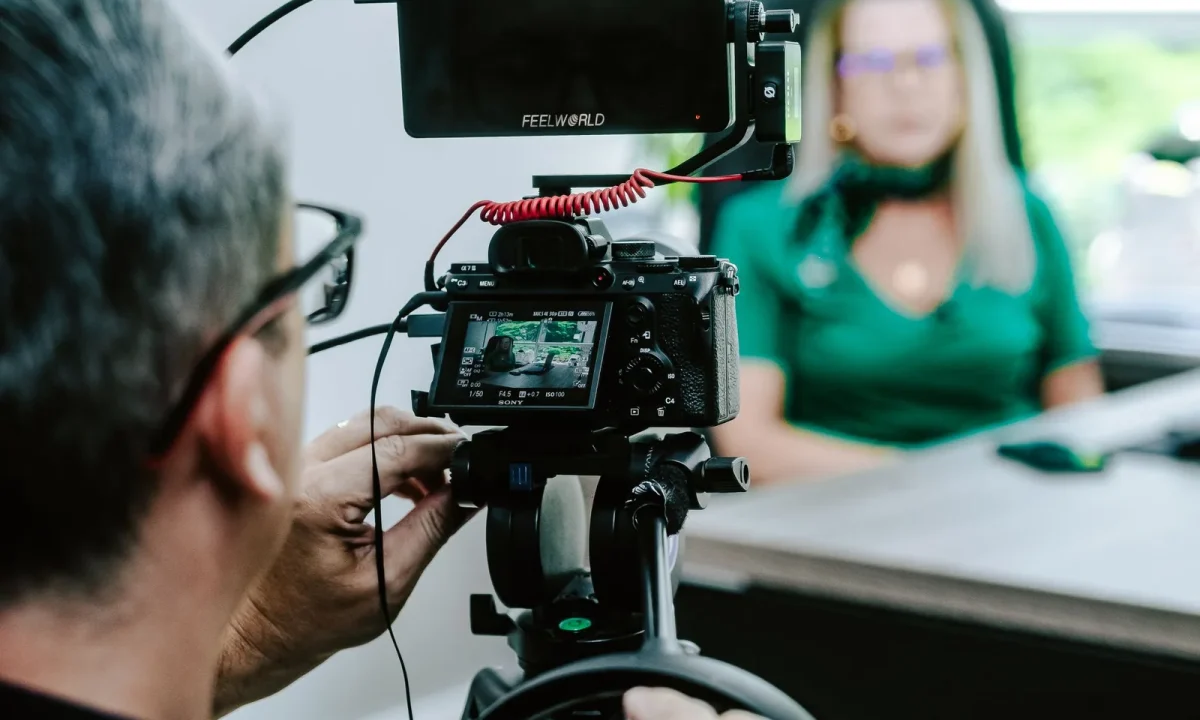
A teleprompter for interviews can transform a stiff, over-rehearsed exchange into a confident, natural-feeling conversation — but only when the setup, script, and delivery work together. This guide walks content creators, video producers, public speakers, and educators through the practical best practices that make on-camera interviews feel effortless. You will find advice that applies whether you are recording a talking-head segment, streaming live, or producing a polished interview series for your audience.
The difference between a teleprompter that helps and one that hurts usually comes down to intention. When used as a safety net — a place to land if memory slips, a way to guarantee that a key statistic or product name is delivered correctly — the prompter frees you to listen, react, and connect. When it becomes a crutch that you read from word-for-word with no room for thought, it drains the life out of the conversation and the audience notices immediately. The best practices below are designed to keep you firmly on the right side of that line, and they translate well to teleprompter for presentations and teleprompter for vlogging workflows too, since all three formats reward the same habits: spoken language, natural eye contact, and rehearsal.
Why a Teleprompter for Interviews Changes the Dynamic
Keeping answers on-message without sounding scripted
Interviews drift. A great question sends you down a tangent, a follow-up pulls you somewhere unexpected, and by the time you return to the point you wanted to make, the thread is gone. A prompter holding your key messages keeps the spine of the conversation visible so you can wander without losing your footing. The trick is to script the answer skeleton rather than the full prose: a headline phrase, two or three supporting points, and the takeaway you want the audience to remember. That structure lets you sound on-message because you genuinely are organized, not because you are reciting. Producers tend to notice the difference in the edit — answers that come from a skeleton are easier to trim, rearrange, and splice than answers that were read rigidly from start to finish.
Reducing cognitive load so you can listen and respond
On camera, you are simultaneously remembering content, monitoring your posture, tracking the interviewer’s tone, and staying aware of the shot. That stack of simultaneous tasks is where hesitation and filler words come from. Offloading the content layer to a visible script frees up mental bandwidth for the part of the job that actually persuades people: active listening. When you are not panicking about what comes next, you can hear the nuance in a question, match the interviewer’s energy, and give a response that actually addresses what was asked. Many speakers describe the effect as the difference between holding a conversation and performing a monologue, and that shift is felt on both sides of the lens.
Balancing structure with spontaneous conversation
The healthiest interview setups combine a prepared prompter track with deliberate open space. Give yourself scripted openings and closings, where exact wording matters, and reserve the middle for semi-structured answers where bullets guide you. Live audiences and edited pieces both benefit from this mix because pure spontaneity risks vagueness, while pure scripting risks stiffness. In practice, you might prompt the first sentence of an answer so you start strong, then finish it in your own words. That hybrid approach is also what makes the skill transferable: the same discipline underpins a teleprompter for presentations and a teleprompter for vlogging, even though the tone changes dramatically between them.
Writing Interview Scripts That Actually Flow
Writing in spoken language, not written language
Written language is dense, subordinate-heavy, and full of clauses that read fine on a page but trip the tongue aloud. Spoken language is shorter, more direct, and more rhythmic. Read your draft aloud as you write it — if you stumble, rewrite the sentence rather than practicing it three times. Contractions, sentence fragments, and conversational connectives all help text feel like speech. The goal is a script that sounds like your best self on a good day, not like a press release. For deeper coverage of drafting and formatting habits, our Mastering Teleprompter Usage guide walks through the fundamentals in more detail.
Using cue cards and bullet prompts for open-ended answers
Not every answer needs full text. For open-ended questions — the kind an interviewer uses to explore a topic — a bullet prompt is more useful than a paragraph. List the three points you want to cover, add the name or figure you must get right, and let the phrasing happen live. This approach preserves authenticity, keeps your eyes moving naturally, and makes follow-up questions easier to absorb because you are not locked into a fixed block of text.
Formatting for readability: line length, breaks, and emphasis
Formatting choices matter as much as wording. Keep lines short enough that your eyes can take in the whole line without scanning, and use generous vertical spacing between thoughts so the next point is visually distinct. Capitalizing key names or figures, or marking them with simple emphasis symbols your software recognizes, gives you a glanceable cue at reading speed. Avoid dense walls of text — under time pressure they become a blur exactly when you need clarity most.
Adapting your script style across interviews, presentations, and vlogging
One script style will not serve every format. Interviews favor bullets and answer skeletons; a keynote demands longer, fully written passages because the delivery is continuous; vlogs sit somewhere in between, with casual paragraphs that keep a conversational tone. Our related resource on how to use a teleprompter for interviews: a complete guide covers the interview-specific approach, while the ultimate guide to using a teleprompter for vlogging shows how looser scripting suits shorter, personality-driven content.
Hardware and App Setup for Interview Shoots
Choosing between dedicated glass prompts, apps, and tablet rigs
Hardware exists on a spectrum. A dedicated beam-splitter prompter places glass in front of the lens so you read while looking directly at the camera, which is the gold standard for interviews. A tablet running a prompter app, mounted close to the lens, is a common and cost-effective alternative for independent creators. The right choice depends on your budget, your shooting environment, and how critical perfect eye line is to the format — a long-form interview series justifies more investment than a quick social clip.
Placement: keeping the prompter close to the lens for natural eye contact
Eye line is the single most visible variable in prompter work. The closer the text sits to the lens, the more natural your gaze appears to the viewer; the wider the gap, the more your eyes seem to drift off-camera in a way audiences read as distracted. Whenever possible, mount the glass or tablet as near to the lens as your rig allows, and rehearse at the actual distance you will shoot from.
Lighting and transparency considerations for readable text
Prompter glass reflects light, so lighting placement needs planning. Aim key lights away from the glass at an angle that avoids glare, and consider the shoot’s background brightness when judging how bright your script text needs to be. In a bright studio, high-contrast text on a dark background tends to remain legible; in a dim room, a glowing tablet can reflect visibly on the glass. Always check the monitor, not just your eyes, to see what the camera actually sees.
Pairing a second device for remote or two-person interviews
For remote or two-person interviews, a single prompter rarely covers everyone. Some setups mirror the script on a second device positioned near the interviewer so both parties see question flow and timing, while remote participants can share a screen or use synchronized scrolling. Coordination at this stage prevents the awkward pauses and talking-over that plague unprepared remote interviews.
Best Practices for Delivery During the Interview
Pacing: letting the scroll speed match your natural rhythm
Scroll speed is a delivery decision, not a technical one. If the text moves faster than you naturally speak, you will rush, clip the ends of words, and sound breathless; if it moves slower, you will pause awkwardly or pre-read ahead and lose engagement with the interviewer. Set the speed during rehearsal by reading a full passage at your comfortable pace, then lock it and resist the urge to tweak mid-session. A well-matched speed becomes invisible — which is exactly the point.
Handling stumbles and recovering mid-answer
Stumbles happen to everyone. The recovery habit that matters most is not stopping the record button, but pausing, taking a breath, and repeating the last clean phrase before continuing. Editors can trim the pause, but they cannot always fix a visibly frustrated restart. Staying composed signals professionalism, and with the prompter still scrolling you always know what comes next, which shortens the recovery window considerably.
Shifting attention between prompter and interviewer
Never stare at the prompter for an entire answer. Alternate: look at the glass for the precise phrases, then return to the interviewer for the connecting thoughts. This rhythm keeps the exchange feeling like a conversation and prevents the flat, glazed expression that gives prompter usage away. During questions and listening moments, your eyes should be fully on the person speaking.
Building on-camera confidence habits before the record button
Confidence is rehearsed, not summoned. Before recording, run the opening twice aloud, check your posture and framing, and note any lines that consistently trip you up. Small rituals like these lower anxiety because they replace uncertainty with familiarity, and over time they make prompter-assisted delivery feel like second nature.
Working With Interviewers and Producers as a Team
Agreeing on question flow before the session
A prompter only helps if it reflects the actual conversation. Share the question order with the interviewer beforehand, or better yet, build the script around the agreed sequence so answers appear in the order they will be asked. When questions shift mid-session, flag it and ask for a scroll adjustment rather than silently struggling to find your place.
Using silent cues to signal re-takes or follow-ups
On set, quiet signals speed everything up. Agree on simple hand gestures for “repeat that,” “shorten it,” or “one more take,” and use the prompter itself as a shared reference when discussing phrasing. Teams that establish this vocabulary early shoot faster and stay calmer under pressure.
Coordinating edits when prompter answers are spliced together
Spliced answers can look seamless or jarring depending on how they were recorded. Keep framing, lighting, and your seating position consistent across takes so cuts between prompter-delivered answers do not expose visible jumps. Deliver each answer as a complete, self-contained statement — clean starts and clean finishes make the editor’s job dramatically easier.
Common Interview Teleprompter Mistakes to Avoid
Reading the full answer word-for-word in a live conversation
The most common mistake is treating a live interview like a speech. Reading lengthy answers verbatim signals that you are not engaging with the questions, and it collapses the moment a follow-up arrives. In live settings, keep the prompter to openings, closings, and exact references; answer the substance in your own words.
Ignoring rehearsal and jumping straight to recording
Recording on the first read is a reliable way to sound rehearsed and stiff at the same time, because you are processing both content and delivery simultaneously. Even two or three out-loud rehearsals smooth the phrasing considerably and reveal the spots where the script works against your natural rhythm.
Forgetting to test the setup in the actual shooting environment
A prompter that reads perfectly in your office may be illegible under studio lights or reflections from a window. Test the full rig — glass angle, text brightness, scroll speed, and camera framing — in the actual location before the interview starts. Twenty minutes of pre-flight testing prevents the far more expensive problem of unusable footage discovered in the edit.
Taking Interview Best Practices to Presentations and Vlogs
Adapting teleprompter for presentations to keynote-style delivery
A teleprompter for presentations typically scrolls a full speech with longer paragraphs and sustained sections, because the delivery is continuous rather than conversational. The habits you built in interviews — spoken-language writing, short readable lines, and disciplined rehearsal — transfer directly, but you should expect to script more completely and practice transitions between sections rather than answer boundaries.
Using teleprompter for vlogging to stay casual on camera
Vlogging demands an even lighter touch. A teleprompter for vlogging works best with loose, conversational paragraphs and generous room for asides, so the footage keeps the spontaneity audiences expect from the format. Position the tablet near the lens rather than investing in heavy rigs, and accept a slightly wider eye line in exchange for a faster, more mobile setup.
Building one workflow that serves multiple content formats
The most efficient creators maintain a single script template with variants for each format, so an interview answer skeleton can be expanded into a presentation section or trimmed into a vlog intro. If you want to deepen any part of this system, our related guides cover the practical territory in detail: using a teleprompter for various video formats effectively, understanding teleprompters for video formats, practical ways to use a teleprompter for video formats, maximizing your teleprompter for video formats, avoiding common mistakes with teleprompters for video formats, a step-by-step workflow for teleprompters across video formats, and choosing the right teleprompter for your project.
Conclusion
A teleprompter for interviews works best when it supports the conversation rather than replacing it. Start with a script written the way you speak, set up your prompter so eye contact stays natural, rehearse until the scroll speed feels invisible, and treat the tool as part of a team workflow. Apply the same habits across interviews, presentations, and vlogging, and your delivery will feel consistently confident in every format. If you are building this into a regular practice, begin with one recorded interview this week: write the answers as bullets, test the rig in your actual shooting space, and notice how much easier it becomes to listen when you already know where the conversation is going.
Frequently asked questions
Does using a teleprompter make me look stiff or rehearsed on camera?
It can, but only if you treat the script as a word-for-word performance. Write in short, spoken-language phrases with natural pauses, run the scroll slightly slower than your comfortable speaking pace, and rehearse until the phrasing sounds like you — that combination keeps delivery conversational rather than read.
Should I script my interview answers word-for-word or just use bullet points?
Bullet points or keyword prompts usually work better for the question-and-answer portion, because they leave room for spontaneous follow-ups and prevent that flat ‘reading’ cadence. Reserve full scripts for set pieces like intro monologues, product explanations, or sponsor reads where exact wording matters.
How do I read a teleprompter and still seem like I’m making eye contact?
Mount the prompter directly in front of and as close to the camera lens as possible so the lens is framed inside the reading area, and keep line lengths short so your eyes barely move. If the prompter sits off to the side or below the lens, the drift in your gaze becomes obvious within seconds.
What scroll speed should I use for interview responses?
Set it about 10-15% slower than your natural speaking rate so you’re leading the text instead of chasing it, and give the operator manual control so they can pause for follow-ups. Speeding up to match fast speech is the most common cause of rushed, breathless delivery.
Can I use a teleprompter for a remote or video-call interview?
Yes — apps and mirror-mode browser tools can scroll text around the webcam window, or you can place a phone or tablet directly beside your camera. The tradeoff is eye-line: on a laptop the offset is often large enough that careful viewers notice, so keyword cards taped near the lens are often the better compromise.
How far should the teleprompter glass sit from the camera and from my face?
Keep the glass 6-12 inches from the lens so the reflected text sits as close to the optical axis as possible, and sit far enough back that your eye movement between lines stays minimal. If you’re working with a large-format rig, a shorter reading distance reduces the visible lateral eye shift.
Recording with a script? Try Lumi.
Keep your script near the camera and out of your final video. Try free for 3 days.
Learn more


